- Разработчик
- PawWorks
- Издатель
- PawWorks
- Дата выхода
- 18 августа 2026
- Платформы
- Windows
- Язык
- Без русского, 1 язык
- Steam
- страница игры
Купить PawPaint со скидкой
Выберите издание и вариант покупки. Регион и способ активации указаны у каждого варианта.
Нет в наличии: 1
Купить PawPaint можно от 1 300 ₽: 1 вариант от 1 продавца, регионы активации: RU.
Анимация И Моделирование, Дизайн И Иллюстрация от PawWorks 2026 года. После оплаты ключ приходит сразу и активируется в Steam.
Подробнее: цена PawPaint по регионам Steam · системные требования · издания · лучшие анимация и моделирование
График изменения цены
Наша минимальная цена стандартного издания по дням.
Собираем историю: первая точка появится после ближайшего обновления цен.
Видео и скриншоты
Об игре
PawPaint is the latest 3D model painting software that has been built with you in mind. Featuring 6 painting channels (color, roughness, metallic, normal, height and emission (+custom channels)) that can be painted individually, together or mixed and matched, PawPaint is perfect for getting your desired look in the texturing phase. Want to find out more? Take a quick scroll to see some of our awesome features.
Buy it once? It’s yours!
We believe that creative tools should be something that you own, so PawPaint has no subscription and never will. No locked features, no pro tier, no monthly costs. You buy it, you own it. Every future update will be included with your purchase, and we greatly appreciate your support by purchasing PawPaint.
Layer Stacks
Materials are built as layer stacks, similar to any 2D image editor/drawing software. The layer panel can host paint layers, fill layers, folders, masks, blend modes, and modifiers you can stack and reorder. Nothing here is destructive. You can save layers, masks and folders as presets and easily use them into your next project.
Model Painting
The paint engine runs efficiently on the GPU meaning strokes stay smooth even on 4K textures. There’s customizable 3 axis symmetry, an eyedropper tool, an RGB color wheel, and a UV view that you can paint on whenever you like.
Import and Export
You can import FBX, OBJ, glTF and most other common formats into PawPaint. Models import with their shape keys, so you can preview them while you paint. When you’re done, export PNG, TGA or EXR texture sets, or pack the whole thing into a glTF/GLB file.
Asset Library
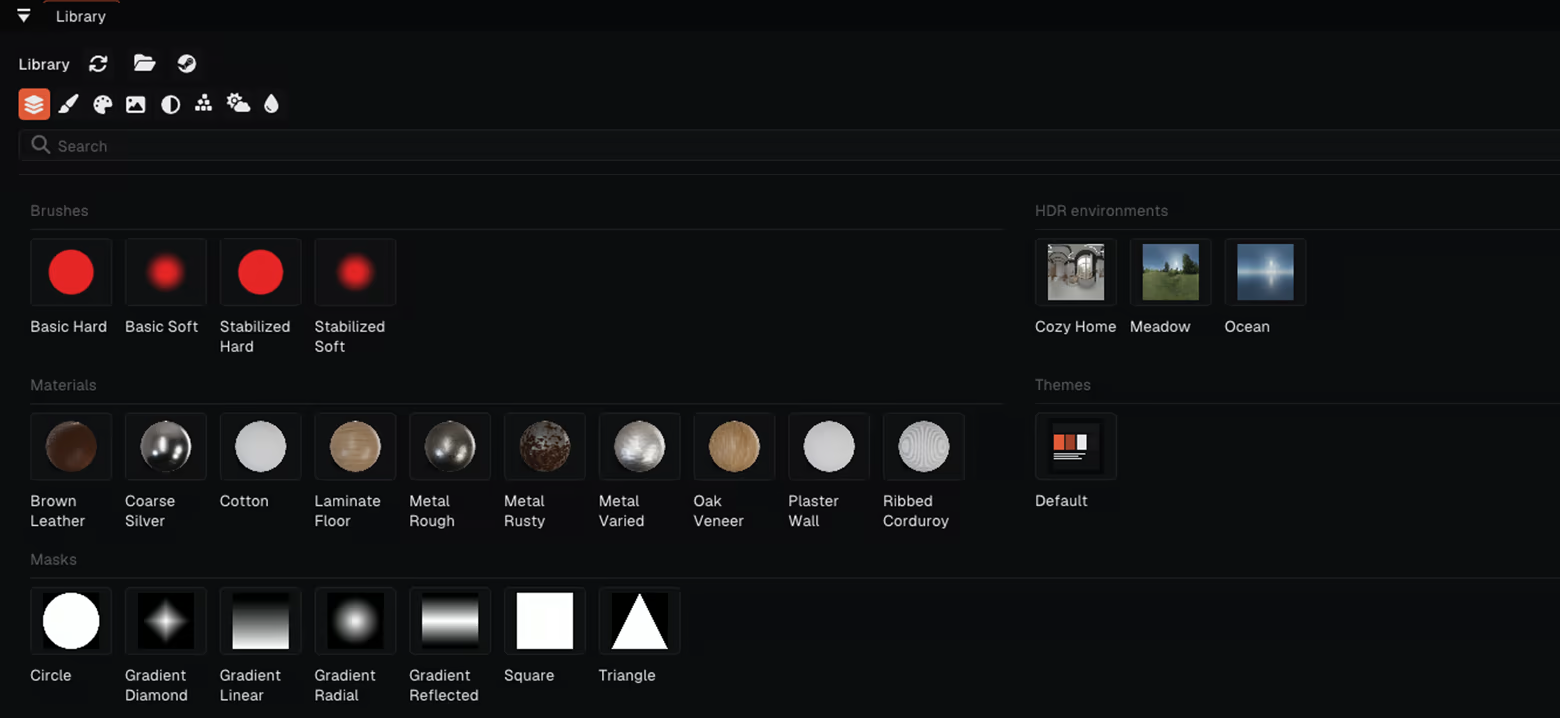
PawPaint comes with a library for brushes, materials, stamps, masks and HDRI environments, which can be easily used in any project. We also have an integrated Steam Workshop page that links directly to the library, where you can browse, use and create community made assets.
Plugins, Themes, and Shortcuts
Every keyboard shortcut can be rebound to whatever key or combination suits you best! The UI theme is customizable, and themes are just files meaning that you can share them with your friends. There’s also a sandboxed Lua plugin API if you want to script tools of your own.
Feature List:
-
PBR channel painting: albedo (color), roughness, metallic, normal, height, emission (and custom channels)
-
Real-time rendered viewport lit by HDR environments
-
Paint layers, fill layers, folders, masks, blend modes, modifiers
-
Optimized painting system
-
Brush symmetry, color wheel, eyedropper tool
-
2D painting in the UV view
-
Per-material stacks and resolution, up to 4096²
-
Library for brushes, materials, stamps, masks and HDRIs
-
Shape-key / blendshape previews
-
Imports FBX, OBJ, glTF and more; exports PNG, TGA, EXR, glTF/GLB
-
Full undo history, rebindable keyboard shortcuts, sharable themes, Lua plugins
-
One price. No subscription, no paywalled features, all updates included.
Системные требования
- 64-разрядные процессор и операционная система
- ОС: Windows 10 64-bit
- Процессор: Quad-core CPU (Intel Core i5-4460 / AMD FX-8350)
- Оперативная память: 8 GB ОЗУ
- Видеокарта: OpenGL 4.5 GPU, 2 GB VRAM (GeForce GTX 750 Ti / Radeon R7 260X / Intel HD 530)
- Место на диске: 1 GB
- Дополнительно: Requires OpenGL 4.5 (compute shaders). Integrated graphics works for 1K-2K textures; a dedicated GPU is recommended.
- 64-разрядные процессор и операционная система
- ОС: Windows 10 / 11 64-bit
- Процессор: Intel Core i5-8400 / AMD Ryzen 5 2600
- Оперативная память: 16 GB ОЗУ
- Видеокарта: Dedicated GPU, 6-8 GB VRAM (GeForce GTX 1060 6 GB / Radeon RX 580 8 GB)
- Место на диске: 2 GB
- Дополнительно: 8 GB VRAM recommended for 4K multi-material projects.
Поддерживаемые языки
| Язык | Интерфейс | Озвучка | Субтитры |
|---|---|---|---|
| английский |
Вопросы и ответы
Сколько стоит PawPaint?
Сейчас минимальная цена 1 300 ₽ — первая строка в таблице выше. Доступно 1 вариант покупки, цены обновляются несколько раз в день.
Ключ PawPaint подойдёт для российского аккаунта Steam?
Игра продаётся в Steam для России, поэтому подходят ключи с регионом RU, СНГ и глобальные без региональных ограничений.
Чем ключ отличается от гифта?
Ключ активируется в клиенте Steam через «Игры → Активировать в Steam». Гифт отправляет продавец через список друзей, для этого нужно добавить его в друзья и принять подарок.
Новости и обновления
Из официального хаба Steam.
Отзывы покупателей
Отзывов пока нет. Играли? Напишите первым.
Похожие игры
 −32% Топ-100
Wallpaper Engine
Анимация и моделирование · Дизайн и иллюстрация
−32% Топ-100
Wallpaper Engine
Анимация и моделирование · Дизайн и иллюстрация
 −11% Топ-100
Phasmophobia
Инди · Ранний доступ
−11% Топ-100
Phasmophobia
Инди · Ранний доступ
 Lethal Company
Инди · Приключенческие игры
385 ₽
Lethal Company
Инди · Приключенческие игры
385 ₽
 −62% Топ-100
Project Zomboid
Инди · Ранний доступ
−62% Топ-100
Project Zomboid
Инди · Ранний доступ
 Топ-100
BeamNG.drive
Гонки · Ранний доступ
880 ₽
Топ-100
BeamNG.drive
Гонки · Ранний доступ
880 ₽
 Топ-100
VRChat
Бесплатные · Казуальные игры
Бесплатно
Топ-100
VRChat
Бесплатные · Казуальные игры
Бесплатно
Оставить отзыв