- Разработчик
- Peter J. Meyer
- Издатель
- Peter J. Meyer
- Дата выхода
- 5 августа 2026
- Платформы
- Windows
- Язык
- Без русского, 1 язык
- Steam
- страница игры
Купить BrickSpace со скидкой
Выберите издание и вариант покупки. Регион и способ активации указаны у каждого варианта.
Нет в наличии: 1
Купить BrickSpace можно от 99 ₽: 1 вариант от 1 продавца, регионы активации: RU.
Казуальные Игры, Экшены от Peter J. Meyer 2026 года. После оплаты ключ приходит сразу и активируется в Steam.
Подробнее: цена BrickSpace по регионам Steam · системные требования · издания · лучшие казуальные игры
График изменения цены
Наша минимальная цена стандартного издания по дням.
Собираем историю: первая точка появится после ближайшего обновления цен.
Видео и скриншоты
Об игре
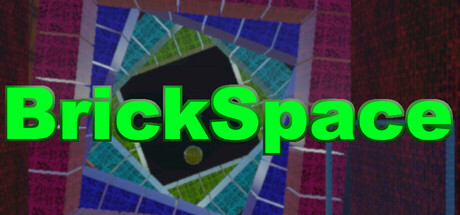
BrickSpace is essentially a 3 Dimensional Zero G Brick Smashing Game, primarily played with the mouse that can move the ‘paddle’ in 4 directions and point of view from behind the paddle. The bricks you break are off in the distance. You score points when the ball hits the bricks. Press the left mouse button to activte a hit knocks the paddle forward, if it hits a ball, it will move down faster. Hold Right Mouse Button to tilt the paddle that can deflect the ball in different dirrections. When all the bricks are cleared, you go to the next level. The Unity 3D version I made has 32 levels with different shapes and bricks laid out in different configurations. Some levels have shifting and rotating sections. Please review video to get a sense of the game play. Brickspace maintains a local 10 highscore list of the current run.
The game prefered input is the mouse, but it can be played with the Joystick or keyboard. Keyboard, the cursor keys move the paddle, CTRL does same function as left mouse button, shift does same as right mouse button. Joystick control is very straight forward. Since there are different joysticks and game pads on the market, fire buttons may be in different locations, however, buttons 1 and 2 do the same function as the left and right mouse button. It does support on controller pause. It may be Button 10 or Start, depending on your gamepad controller.
On the main menu under the title screen, pressing Start on the gamepad, or higlighting "Start Game" and pressing a firebutton on the gamepad will automatically set the game controller to gamepad. Pressing Space or Enter on the keyboard with "Start Game" higlighted will set the game controller to keyboard. Ciicking on it with the mouse, will set to Mouse. Selecting the controller with "Select Cntroller" menu will set to the desired controller, and the game will play using the selected controller, even if another device was used to select "Start Game."
BrickSpace also sends random power ups towards your paddle after smashing bricks. Their functions are as follows:
B Big Ball, the next ball touches your paddle will enlarge.
C Crazy Ball, next ball touching the Paddle will randomly change direction
D Double. Next Ball the touches will become two.
F Fast Ball for 30 Seconds. Balls are accelerated after hitting the paddle, but restore to normal speed when smashing a birick.
G Guided Ball for 30 Seconds. Balls moving away the paddle can be shifted with the paddle movement.
H Hold Ball for 30 Seconds. Balls will stick to the paddle until the fire/mouse button is pressed, and balls move straight away from the paddle.
J Jolt. When touched, the Paddle is frozon for 5 seconds.
K Knock Through for 30 seconds. When Ball hits a brick, it reverses in slightly random directional shift, and could smash additional Bricks.
L Large Paddle. Paddle is enlarge.
M Moving Blocker for 30 seconds. A second paddle appears and will follow, or be in a prior paddle position. This will always be the normal paddle size, even if the main paddle is enlarged or shrink.
O Original Size. If the paddle is enlarged or shrunk, the paddle will be restored to it’s normal size.
Q Quad. Up to 4 balls can be split from the paddle. Only 2 or 3 balls could appear. Note, the game is limited to 8 balls on the screen at one time. If many balls are already on the screen, less than 4 additional balls could appear.
S Small Paddle Size. Paddle is Shrunk.
T Transport. Ball will phase, and be sent to the far end of the 3D space, and dephase. The Ball could be placed behind a bunch of bricks and would need to smash them before ball can get back to the paddle.
U 1 Up
W Wacky Ball for 30 Seconds.
X eXplosive Ball. Next Ball the hits will become explosive, and when hits a brick, it will ‘explode’ that also smashes bricks close by. The ball is restored to normal.
100 Points
250 Points
500 Points
Sometimes a random extra ball could appear when smashing bricks.
Towards the end of the level with 5 or less bricks remaining. If the ball bounces off the walls and paddle many times without hitting a brick, a (H) Hold Power up will appear that you can grab with the paddle.
Version Difference:
1.1 Added Start Button Pause.
1.2 Added GamePad and Keyboard function with the title screen menu.
1.3 Added Full Screen Mode. Starting Level is shown on the button. Have an option to play full screen.
1.4 Corrected an issue with Validating and Steam Connection.
1.5 Correct Issue with Pause. Now includes some compansation for displays under 1280×1024, but some displays still may not work. The game is still recommended for 1280×1024 or greater.
Technical Notes: The game is designed using modern displays with monitors 1280×1024 or greater. It may not display correctly on displays with lower resolutions. As of version 1.5, it tries to adjust for low res displays, but there is no guerentee it will work for all displays.
Системные требования
- 64-разрядные процессор и операционная система
- ОС: 10
- Процессор: Atleast 2 ghz
- Оперативная память: 2 GB ОЗУ
- Видеокарта: 3D Card
- DirectX: версии 12
- Сеть: Широкополосное подключение к интернету
- Место на диске: 50 MB
- Звуковая карта: Onboard or PCI Express
- Дополнительно: Game only tested on Windows 11 machine
- 64-разрядные процессор и операционная система
- ОС: 11
- Процессор: 3ghz
- Оперативная память: 2 GB ОЗУ
- Видеокарта: 3D Card
- DirectX: версии 12
- Место на диске: 50 MB
- Звуковая карта: Onboard or PCI Express
- Дополнительно: Game only tested on Windows 11 machine
Потянет ли BrickSpace на вашем ПК?
Оценка ориентировочная: сравниваем вашу видеокарту и память с минимальными и рекомендуемыми требованиями Steam. Проверить другие игры
Поддерживаемые языки
| Язык | Интерфейс | Озвучка | Субтитры |
|---|---|---|---|
| английский | — |
Вопросы и ответы
Сколько стоит BrickSpace?
Сейчас минимальная цена 99 ₽ — первая строка в таблице выше. Доступно 1 вариант покупки, цены обновляются несколько раз в день.
Ключ BrickSpace подойдёт для российского аккаунта Steam?
Игра продаётся в Steam для России, поэтому подходят ключи с регионом RU, СНГ и глобальные без региональных ограничений.
Чем ключ отличается от гифта?
Ключ активируется в клиенте Steam через «Игры → Активировать в Steam». Гифт отправляет продавец через список друзей, для этого нужно добавить его в друзья и принять подарок.
Новости и обновления
Из официального хаба Steam.
Отзывы покупателей
Отзывов пока нет. Играли? Напишите первым.
Похожие игры
 Топ-100
Marvel Rivals
Бесплатные · Гонки
Бесплатно
Топ-100
Marvel Rivals
Бесплатные · Гонки
Бесплатно
 People Playground
Инди · Казуальные игры
259 ₽
People Playground
Инди · Казуальные игры
259 ₽
 −25%
Vampire Survivors
Инди · Казуальные игры
−25%
Vampire Survivors
Инди · Казуальные игры
 Топ-100
Once Human
Бесплатные · Гонки
Бесплатно
Топ-100
Once Human
Бесплатные · Гонки
Бесплатно
 Marvel’s Spider-Man Remastered
Казуальные игры · Приключенческие игры
100 ₽
Marvel’s Spider-Man Remastered
Казуальные игры · Приключенческие игры
100 ₽
 Топ-100
Aimlabs
Бесплатные · Инди
Бесплатно
Топ-100
Aimlabs
Бесплатные · Инди
Бесплатно
 −20%
Castle Crashers®
Инди · Казуальные игры
−20%
Castle Crashers®
Инди · Казуальные игры
 −76%
Starbound
Инди · Казуальные игры
−76%
Starbound
Инди · Казуальные игры
 −80%
Stick Fight: The Game
Инди · Казуальные игры
−80%
Stick Fight: The Game
Инди · Казуальные игры
 −13%
Muse Dash
Инди · Казуальные игры
−13%
Muse Dash
Инди · Казуальные игры
 −36%
Brotato
Инди · Казуальные игры
−36%
Brotato
Инди · Казуальные игры
 CarX Drift Racing Online
Гонки · Казуальные игры
550 ₽
CarX Drift Racing Online
Гонки · Казуальные игры
550 ₽
Оставить отзыв